Why AI-Built MVPs Break in Production: 7 Common Failure Modes
Why a convincing demo does not guarantee a stable MVP after launch: seven common problems with environments, failures, access, data, and recovery.
In brief
- • A demo checks the happy path while production exposes exceptions.
- • Environment drift, access control, migrations, and integrations are common failure points.
- • A launch needs a test environment, logs, a backup, and a rollback plan.
ContentsShow sections
The demo works — then production breaks
An MVP can look convincing in a demo: a user opens the page, clicks a button, and gets the expected result. Production adds different conditions: a real domain, real data, concurrent users, network failures, limited permissions, and paths nobody tested manually.
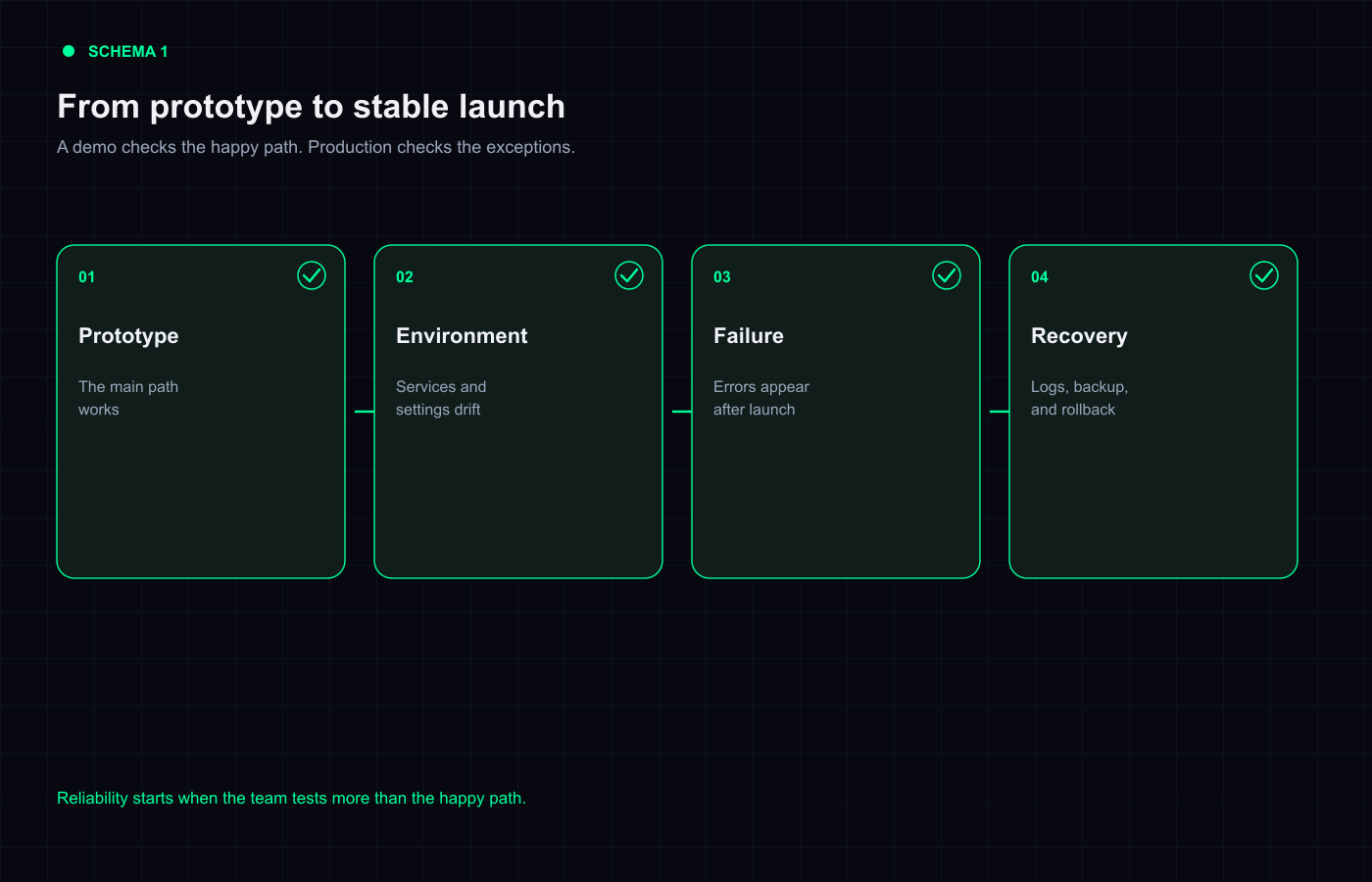
This is not a special kind of “bad AI code.” The deeper problem is that a prototype is usually checked against the happy path, while a product has to survive exceptions. AI can help assemble the first version quickly, but it does not know the business rules, the cost of failure, or the recovery plan unless someone defines them.
Here are seven reasons an MVP built with vibe coding often needs more work before launch.
1. Development and production use different settings
Local development may use a test database, one set of environment variables, and broad access to external services. Production changes the URLs, keys, domains, permissions, limits, and startup order. The code may be the same, but its environment is not.
Authentication, file uploads, webhooks, email, and background jobs are common failure points. In the browser, the symptom may be “the button does nothing” even though the cause is a server error or a missing environment variable.
Before launch, keep separate configuration for Preview and Production, document the variable names without exposing secret values, and run the app from a clean environment. Vercel, for example, scopes variables to environments and applies changes to new deployments rather than old ones.
2. Only the happy path was tested
A request to “build an order form” often leads to one test: open the form, fill it in, and submit it. Real users leave fields empty, refresh during a request, click twice, lose the network, or send an unexpected value.
Those cases do not automatically mean the implementation is poor. They mean the acceptance criteria were too narrow. For every important action, define both the expected result and the failure behavior: what the user sees, what gets logged, and whether the operation can be safely repeated.
3. Authentication exists, but authorization is incomplete
A login screen does not prove that access control is correct. The bug may sit in a role check, an ownership check, a server handler, or a direct URL. A user who cannot see someone else’s order in the interface may still be able to request it through an API endpoint.
Test roles separately: guest, regular user, contractor, and administrator. For each role, write down what it can read, change, and delete. Test the server boundary as well as the visible buttons.
4. The data model looks simpler than the business rules
The first version often stores data in the quickest shape that can render a screen. After launch come statuses, history, retries, cancellations, and migrations. If those rules were never modelled, a small change starts touching several parts of the system.
Watch for changes to required fields, record deletion, duplicate payments, inconsistent statuses, and migrations against populated tables. Keep a schema version, take a backup before changing data, and document a rollback. A production migration without a recovery plan is not a small code edit.
5. Dependencies and runtime versions drift
An agent may follow current library documentation while the repository uses a different version. A local install may resolve fresh dependencies while the server uses a lockfile or a different runtime. The failure appears only during the build or after deployment.
Pin the runtime, dependency, and database versions used for the release. Run a clean install and a production build in the same mode as the live environment. Review security warnings and incompatible upgrades instead of hiding them in the build log.
6. There is no observability or safe rollback
When users report an error, the team needs to answer three questions quickly: where did it happen, who was affected, and how can the last working version be restored? Without structured logs, error tracking, backups, and a previous deployment, people have to guess.
A sensible baseline for a small MVP is a log of important server events, an alert for critical failures, a data backup, and a tested application rollback. Monitoring does not make code correct, but it shortens the time between failure and recovery.
7. The prototype was never tested against real limits
One user does not show how the system behaves with concurrent requests, a large upload, or a slow external API. Provider limits, timeouts, and response sizes often appear only after real users arrive.
You do not need a complex platform for every MVP. You do need to name the expected load, test the most expensive operations, and decide what happens when a limit is reached. For each external service, record the quota, billing owner, failure behavior, and key rotation process.
How to check an MVP before launch
Make the check a separate delivery stage instead of the last message in a chat with the contractor:
- list the main user journeys and the failures they must handle;
- run the project in a clean environment on a test domain;
- test every role and direct server request;
- test migrations on copied data and create a backup;
- run the tests, production build, and dependency checks;
- trigger a controlled error and confirm that it is visible in logs;
- write down the rollback and access handover before enabling Production.
If the code already exists, request a diagnosis with a risk map, a prioritised fix list, and acceptance criteria. If you are starting an MVP, begin with a clear project brief on VibeMarket rather than a promise to “build everything fast.”
The short answer
An MVP does not break in production simply because AI was involved. It breaks when a demo is treated as a product and the environment, failure cases, access rules, data, and recovery path are left untested. AI can speed up the first version; responsibility for launch begins where the happy path ends.
Discussion
Comments
No comments yet. Be the first to share your experience.
Sign in to join the discussion →