Developer and Vibe Coder Portfolio: How to Build a Strong VibeMarket Profile
A practical guide to building a developer portfolio on VibeMarket, including specialization, profile copy, rates, project descriptions, media, and project control verification.
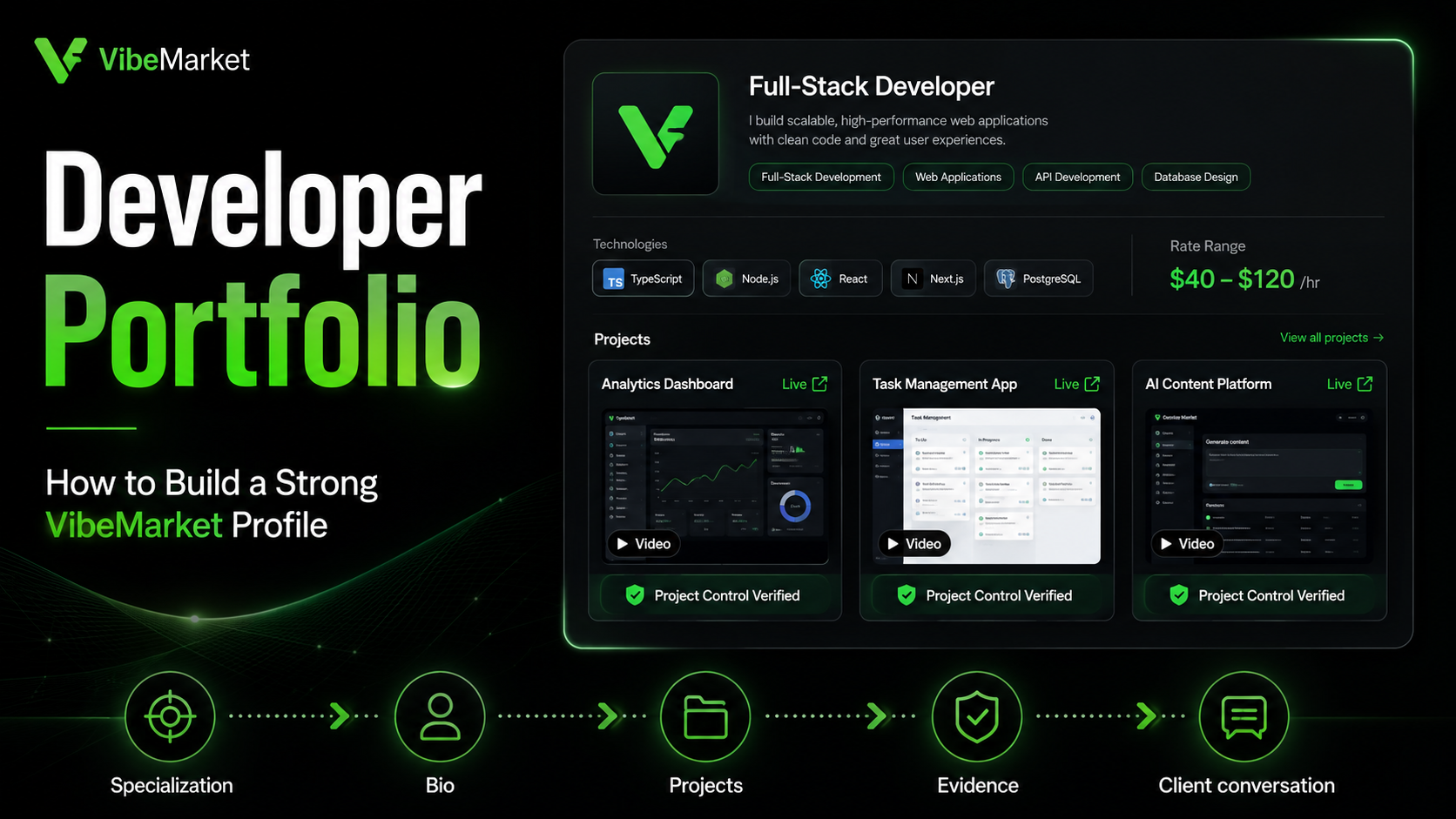
In brief
- • A portfolio should demonstrate the ability to deliver working products rather than only list technologies.
- • The profile title should immediately explain the developer's specialization and product focus.
- • The bio should describe client value, the working process, and what the client receives after delivery.
- • VibeMarket profiles support between one and five service categories and up to eight main technologies.
- • Three detailed projects are usually more convincing than ten superficial portfolio cards.
- • Every project description should explain the task, personal contribution, features, technology stack, verification, and current status.
- • A working link and short demonstration video provide more evidence than a single polished screenshot.
- • Domain, bot, or application verification confirms control over a product but does not prove authorship of the entire codebase.
- • AI tools should be presented through the developer's review and testing process rather than as an advantage by themselves.
- • A new profile without reviews can be strengthened through working products, honest descriptions, videos, and project control verification.
ContentsShow sections
Polished cards, a long technology list, and a GitHub link do not prove that a developer can build and launch a working product.
Clients want to understand something else:
which problems you solve;
what you have already built;
which parts you completed personally;
whether the result can be opened;
how you verify quality;
whether you can maintain the product after release.
A strong portfolio is therefore built around evidence rather than the number of tools listed.
This guide explains how programmers and vibe coders can build a VibeMarket profile, select projects, write useful descriptions, upload media, and increase trust in their work.
What should a developer portfolio prove?
A portfolio should answer four main questions.
What do you build?
Clients should quickly understand your specialization:
Telegram bots;
Telegram Mini Apps;
websites;
SaaS products;
marketplaces;
mobile applications;
automation tools;
administration panels;
integrations;
internal business systems.
Which problems can you solve?
A technology name is not enough.
React does not explain whether you can build user dashboards. Python does not prove experience with bots. PostgreSQL does not show whether you can design permissions and store data safely.
Practical examples are more useful:
an appointment service;
a catalogue and shopping cart;
an administration panel;
a request-processing system;
a mobile application;
a CRM integration;
a payment flow;
an internal analytics tool.
What did you complete personally?
One product may involve a designer, frontend developer, backend developer, and product owner.
The client needs to know:
whether you designed the interface;
whether you built the backend;
whether you created the database;
whether you connected integrations;
whether you configured deployment;
whether you fixed post-launch defects;
whether you still maintain the product.
Can the result be trusted?
Trust can be strengthened through:
a working link;
a demonstration video;
a clear project description;
project control verification;
real reviews;
an explanation of testing;
a transparent handover process.
How clients review a profile
Clients rarely read every line from beginning to end.
A common journey is:
Read the profile title.
Check specialization.
Open the portfolio.
Review one or two projects.
Open a link or video.
Check the rate.
Read the bio.
Review feedback and verification.
Decide whether to begin a conversation.
The most important information should therefore be easy to find.
Step 1. Write a clear profile title
A VibeMarket profile title can contain up to 120 characters.
It should explain which problems you solve.
Weak examples:
Programmer.
Vibe coder.
Fullstack developer.
I can build any project.
These titles do not explain specialization.
Stronger examples:
I build Telegram Mini Apps, bots, and internal business services.
Fullstack developer for SaaS products, marketplaces, and customer dashboards.
React Native developer for Android and iOS applications.
Python developer for automation, data processing, and Telegram bots.
Profile title formula
Use this structure:
Role + product type + audience or specialization.
Examples:
Fullstack developer for small-business web services.
Telegram Mini App and payment bot developer.
React and Next.js frontend developer for SaaS products.
Avoid listing every technology in the title. Use the technology field for that.
Step 2. Select service categories
VibeMarket profiles support between one and five service categories.
Do not select everything only to appear in more places.
A profile promising websites, mobile apps, games, blockchain, design, analytics, and automation at once may be difficult to understand.
Choose categories that:
are supported by your portfolio;
match your current level;
represent the work you want;
are connected to each other;
create a clear professional focus.
For example:
Telegram Mini Apps;
Telegram bots;
web applications;
automation.
This group creates a consistent positioning.
Step 3. Add your main technologies
A profile can include up to eight technologies.
Choose technologies that:
you use in real projects;
you are ready to use for new work;
you can explain;
are supported by portfolio items;
relate to your specialization.
Example:
TypeScript;
React;
Next.js;
Node.js;
PostgreSQL;
Docker;
Telegram Bot API;
React Native.
You do not need to list every AI tool, editor, and library.
Clients evaluate the result first. Technology provides implementation context but does not replace evidence.
Step 4. Write the bio
The VibeMarket bio supports up to 1,200 characters.
Avoid using the complete space for generic qualities:
Responsible, communicative, quick learner, and always available.
These statements are difficult to verify and appear in many profiles.
A useful bio explains:
what you build;
who you build it for;
which problems you solve;
how you work;
how you verify the result;
what the client receives;
whether support is available.
Example bio
I build Telegram Mini Apps, bots, and web services for small businesses. I can support a project from initial requirements and planning to deployment.
I work with TypeScript, Next.js, Node.js, PostgreSQL, and Docker. I implement user dashboards, catalogues, administration panels, notifications, and integrations.
Before release, I review critical user flows, permissions, error handling, and the production build. After completion, the client receives the repository, infrastructure access, and launch instructions.
I am available for both new MVP development and improvements to existing products.
Useful additional information
preferred project types;
availability;
collaboration format;
launch experience;
testing approach;
post-release support.
Information to avoid
guarantees that cannot be proven;
promises to build everything in one day;
claims to work with every technology;
invented experience;
unsupported metrics;
attacks on other developers.
Step 5. Set a rate
Profiles support minimum and maximum rates in TON.
The range gives clients an initial pricing signal but does not replace a project estimate.
Explain when necessary:
whether the rate is hourly;
whether it is only a reference;
which tasks are estimated separately;
whether discovery is included;
whether design is included;
whether deployment has a separate cost;
how maintenance is priced.
Avoid using an extremely wide range without explanation.
A rate between 1 and 1,000 TON does not help the client understand the expected cost.
When pricing depends heavily on the project, provide a realistic reference range and explain that the final estimate follows a requirements review.
Step 6. Select portfolio projects
Three well-presented projects are usually enough for a strong first portfolio.
Project one: your primary specialization
Choose a project that closely matches the work you want.
Examples:
a Telegram Mini App catalogue;
a SaaS product;
a mobile application;
a company website;
a business automation bot.
Project two: a more complex system
Use it to demonstrate depth:
several user roles;
a database;
an administration panel;
payments;
integrations;
deployment;
testing.
Project three: an additional skill
Examples:
mobile development;
an internal tool;
AI automation;
an analytics dashboard;
an external API integration.
Three strong projects are more convincing than ten cards without descriptions or working links.
Step 7. Use a clear project title
The title should explain what the product does.
Weak:
Project 1.
Pet Project.
My App.
Test Website.
Stronger:
Telegram Mini App for Client Booking and Schedule Management.
SaaS Request Processing and Task Assignment Service.
Personal Finance Mobile Application.
Online Store Administration Panel.
A brand name can be included, but the product type should still be clear.
Example:
FinCompass: Personal Expense Tracking Mobile App.
Step 8. Describe the project as a case study
A project card should tell a story instead of only listing technologies.
The task
What needed to be built and why?
The business accepted bookings through Telegram messages. It needed one interface where customers could select a service, date, and time while managers controlled the schedule.
Users
Who uses the product?
The application is used by customers, managers, and administrators.
Personal contribution
What did you complete?
I designed the application structure, built the frontend and backend, configured the database, Telegram authentication, notifications, and deployment.
Main features
What does the product support?
service catalogue;
date selection;
user dashboard;
administration panel;
notifications;
booking status changes.
Technology stack
Include only the main technologies:
Next.js, TypeScript, PostgreSQL, Docker, and Telegram Bot API.
Difficult part
Which challenge required special attention?
The system had to prevent two users from booking the same time and restrict employee access to customer data.
Verification
How was quality checked?
I tested critical flows, mobile layouts, permissions, repeated requests, and the production build.
Result
What is the current status?
The product is deployed, available to users, and continues to be developed.
Copyable project description template
Title
What type of product is it?
Task
Which problem needed to be solved?
Users
Who uses the product?
My role
What did I complete personally?
Main features
Which scenarios are implemented?
Technology stack
Which main technologies were used?
Difficult part
Which non-trivial problem was solved?
Verification
Which tests and user flows were completed?
Result
Where does the product run, and what is its current status?
Materials
Working link, screenshots, and demonstration video.
Step 9. Add a working link
A working link is one of the strongest forms of evidence.
Before adding it, verify:
The project opens.
HTTPS works.
No server error appears.
Mobile layouts work.
The product purpose is clear.
No secret access is required.
The domain has not expired.
Main controls function correctly.
Do not add localhost links, closed servers, or error pages.
When a project is private, state that honestly and use an approved demonstration video or screenshots instead.
Step 10. Select screenshots
Portfolio images may use JPG, PNG, WEBP, or GIF.
A useful set may include:
Main screen.
Critical user flow.
Administration panel.
Mobile version.
Important feature or result.
Avoid uploading ten almost identical screens.
The first image should:
be readable;
explain the product purpose;
contain no personal data;
show the actual interface;
work well as a card cover.
Never expose
passwords;
tokens;
secret keys;
customer personal data;
confidential analytics;
private documents;
production infrastructure access.
Step 11. Add a video
A short video can demonstrate functionality that cannot fit into one screenshot.
Video is especially useful for:
Telegram bots;
Mini Apps;
mobile applications;
administration panels;
complex user journeys;
private products.
VibeMarket supports MP4 project videos up to 10 MB.
Demonstration structure
Name the product.
Explain the problem.
Show the primary user journey.
Demonstrate important features.
Explain your contribution.
Show the result.
The video does not need to be long. Clients need to understand the product quickly.
Step 12. Arrange media as a story
One project can contain up to ten media files.
Arrange them as a journey:
Project cover.
Main interface.
Primary user action.
Action result.
Administration interface.
Mobile version.
Additional feature.
Video.
This turns a collection of images into a product demonstration.
Step 13. Verify a published website
VibeMarket allows developers to confirm control over a project domain.
Available methods include:
DNS TXT record;
verification file;
meta tag.
Repository access is not required.
Verification proves that the profile owner controls the domain or can modify the published project. It does not prove that every line of code, design element, or piece of content was created by one person.
The project description should still explain personal contribution honestly.
Step 14. Verify a bot or application
Project control can also be confirmed for:
Telegram bots;
Telegram Mini Apps;
Android applications;
iOS applications.
The method depends on the product.
A Telegram bot may use a temporary token check. The token is only needed for verification and should not appear in the portfolio.
Mini Apps and mobile applications may use a one-time runtime request or a manual screenshot review.
Verification confirms access to the product but does not replace a clear explanation of the developer's role.
Step 15. Present AI-tool usage correctly
Vibe coders naturally use Cursor, Claude Code, Codex, and other tools.
However, a client needs more than the name of an AI service.
Weak descriptions:
Built entirely with AI.
Written in Cursor.
Used Claude.
These statements do not explain quality.
Stronger:
I used AI agents for repository analysis, component preparation, and refactoring. Every change was reviewed through diffs, tests, production builds, and manual verification of critical user flows.
You can also explain:
how the task was divided;
which changes were reviewed manually;
where tests were used;
how dependencies were controlled;
how security was checked;
which defects you resolved independently.
AI can accelerate the work, but responsibility remains with the developer.
What to do without commercial projects
A lack of commercial experience does not require an empty portfolio.
Build a complete personal project that solves an understandable problem.
Examples:
an appointment service;
a Telegram Mini App;
a small-business CRM;
an expense tracking app;
a catalogue with an administration panel;
a document generator;
a mobile application;
a booking service;
an analytics tool;
an AI assistant.
Strengthening a personal project
Add:
authentication;
a database;
user roles;
error handling;
a mobile layout;
tests;
deployment;
documentation;
a video;
a working domain.
Do not present an educational project as a paid client project.
A clear description is acceptable:
A personal project created to demonstrate Telegram Mini App development skills.
Honesty is stronger than an invented client.
Building a profile without reviews
A new developer can replace missing reviews with other evidence.
Show working products
Let clients open the result.
Explain personal contribution
Do not leave projects without context.
Add video
It helps clients understand functionality quickly.
Verify project control
Use the available domain, bot, or application methods.
Suggest a limited first stage
Examples:
an audit;
a prototype;
one screen;
a small integration;
a technical plan;
one specific bug fix.
This reduces risk for both sides.
Never invent reviews
A fake review can damage trust more than having no reviews.
Using Vibe Card
Vibe Card presents key profile information in a shareable format.
It can be used:
on social media;
in a message to a potential client;
in a professional community;
when introducing yourself;
as an additional portfolio link.
The card does not replace detailed project cases.
An interested client will still open the profile and review the evidence.
Common portfolio mistakes
Overly broad specialization
The profile promises websites, games, applications, design, SEO, and marketing at once.
Empty bio
The client cannot understand the developer's approach.
Technology list only
There is no evidence of what the developer can build.
Broken links
Projects are unavailable or show errors.
Team project without role explanation
The personal contribution is unclear.
Repetitive screenshots
Several images provide no new information.
Missing mobile version
A public web product works poorly on phones.
Secrets in screenshots
Tokens, user data, or private panels are visible.
Invented results
The profile includes unverified clients, revenue, or performance metrics.
Guaranteed-order promises
A strong profile provides evidence but cannot guarantee a project.
Maintaining the portfolio
A portfolio should not be completed once and forgotten.
Every few weeks, review:
working links;
screenshots;
personal role descriptions;
current technology stack;
new results;
possible videos;
outdated copy;
project order.
After completing new work:
Request permission to publish it.
Remove confidential information.
Prepare a short description.
Record a demonstration.
Add a current link.
State the current project status.
Verify project control where possible.
Profile checklist
Before publication, confirm:
The title explains specialization.
Only relevant categories are selected.
Main technologies are listed.
The bio explains client value.
The rate is realistic.
At least two or three projects are included.
Every project has a clear title.
The original task is explained.
Personal contribution is stated.
Main features are listed.
A working link is provided.
Screenshots are understandable.
Complex flows have a video.
No secrets or personal data are exposed.
The current product status is clear.
Available domains, bots, or apps are verified.
AI tools are explained through the review process.
Clients and results are not invented.
The strongest project appears first.
Every link was checked before publication.
How VibeMarket presents developer experience
A public developer profile combines:
professional title;
bio;
service categories;
technologies;
rate range;
portfolio;
reviews;
available verification;
Vibe Card.
These fields are not useful when completed superficially.
A well-prepared profile allows clients to understand specialization, open projects, and evaluate the developer's approach.
Create a developer profile on VibeMarket
Related articles:
Final thoughts
A strong programmer or vibe coder portfolio is not built around the number of technologies listed.
It should demonstrate:
clear specialization;
working products;
personal contribution;
main features;
verification process;
current links;
videos and screenshots;
honest project status;
responsibility for the result.
Clients do not select the developer who lists the most AI tools and frameworks. They select the person who has already solved similar problems and can present credible evidence of that work.