How Much Does Mobile App Development Cost in 2026: iOS, Android, or Cross-Platform?
A practical guide to freelancer mobile app pricing, native and cross-platform development, backend work, store publishing, and ongoing product costs.
In brief
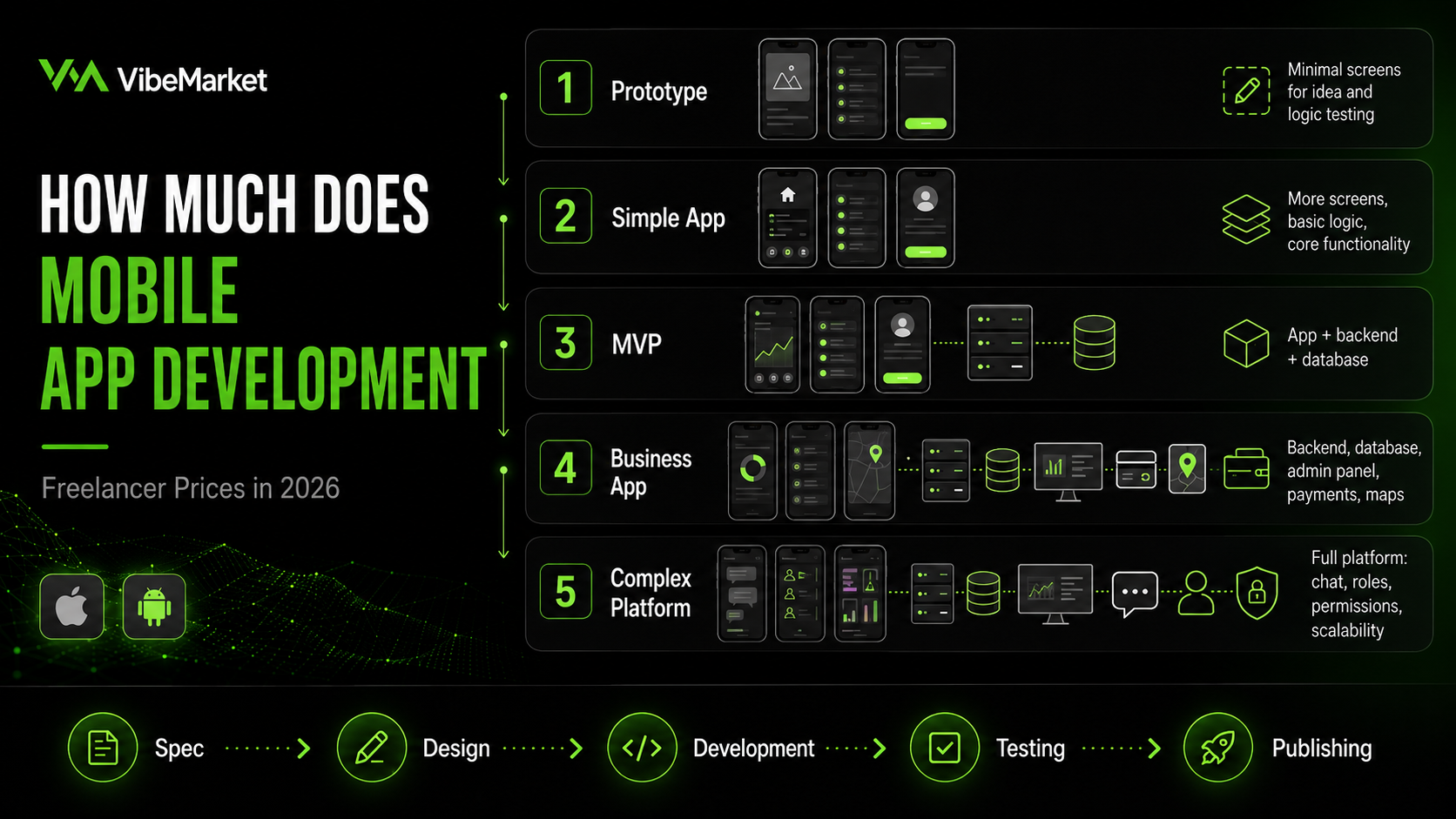
- • Mobile app development cost depends on features, backend systems, integrations, and publishing requirements rather than the number of screens alone.
- • A simple prototype or small application without a complex backend may cost approximately $400-$1,000 from a freelancer.
- • A small cross-platform application with finished design and an existing API commonly requires a budget of $1,000-$2,500.
- • A complete MVP with authentication, backend, database, administration panel, and store publishing may cost $2,500-$6,500.
- • A business application with payments, maps, chat, and external integrations commonly costs $6,500-$15,000.
- • A complex marketplace, delivery platform, fintech product, or multi-role system may start from approximately $12,500.
- • Cross-platform development reduces part of the implementation work but does not remove backend, design, testing, or separate iOS and Android verification.
- • App Store and Google Play accounts should belong to the client rather than remain under the freelancer's personal ownership.
- • Clients should review published applications, personal contribution, testing processes, source code handover, and post-launch support.
- • The cheapest advertised service often excludes backend development, administration tools, store publishing, testing, and review-related corrections.
ContentsShow sections
The request to “build a mobile app” may describe completely different products.
One business may need a simple catalogue with several screens. Another may require authentication, payments, geolocation, push notifications, a backend, and an administration panel. A third may be planning a marketplace, delivery platform, or fintech product.
These projects cannot have the same price.
Freelance platforms contain offers ranging from very small fixed-price tasks to projects costing tens of thousands of dollars. However, the headline price may cover only a prototype, interface implementation, Android build, or connection to an existing API.
A mobile product should therefore be evaluated by its complete scope rather than screen count or the promise of “iOS and Android development.”
The dollar ranges in this article are rounded equivalents of current Russian-speaking freelancer offers. They should not be interpreted as average agency pricing in the United States or Western Europe.
Quick answer: how much does freelancer mobile app development cost?
Project type | Realistic freelancer budget | Approximate timeline |
|---|---|---|
Prototype or small app without a complex backend | $400-$1,000 | 1-4 weeks |
Small cross-platform app connected to an existing API | $1,000-$2,500 | 1-2 months |
Complete MVP with backend and administration panel | $2,500-$6,500 | 2-5 months |
Business application with integrations | $6,500-$15,000 | 4-9 months |
Complex marketplace, delivery, or fintech platform | From $12,500 | From 6 months |
These numbers are not official statistical averages or guaranteed final prices.
They are practical budget ranges based on current public freelancer offers. The final estimate depends on platforms, functionality, backend requirements, integrations, design readiness, and acceptance criteria.
Why are some applications advertised for $100-$400?
A low advertised price may cover one limited task:
several screens;
interface implementation from a completed design;
a simple Android application;
a WebView wrapper;
connection to an existing API;
a bug fix;
an application build;
publishing an already completed product;
consultation;
a prototype without production infrastructure.
The offer may exclude:
discovery;
UI and UX design;
backend development;
database;
administration panel;
authentication;
payments;
push notifications;
analytics;
device testing;
publishing on both platforms;
post-launch support.
A service card offering “a mobile app for $250” does not necessarily describe a complete commercial product.
Different products described as mobile applications
1. Simple prototype
A prototype helps test an idea or present the planned product to stakeholders.
It may include:
several screens;
navigation;
demonstration data;
a simple form;
basic interactions;
one primary scenario.
A real backend and production database may not exist.
The product should not automatically be considered ready for real users.
A realistic freelancer budget is approximately $400-$1,000.
2. Small application with an existing API
The business may already have:
a website;
a backend;
a database;
customer accounts;
an API.
The freelancer creates the mobile interface and connects it to the existing system.
The application may include:
sign-in;
catalogue;
product or content pages;
profile;
activity history;
notifications;
several main flows.
A realistic budget is approximately $1,000-$2,500.
The condition of the API matters. Poor documentation and unstable server behavior may make integration more difficult than interface development.
3. Complete MVP
An MVP is the first working version that can be tested with real users.
It may include:
iOS and Android;
registration;
authentication;
user profile;
core business logic;
backend;
database;
administration panel;
push notifications;
analytics;
publishing;
basic testing.
A realistic freelancer budget is approximately $2,500-$6,500.
The lower end is possible when the product has limited scope, finished design, and clearly defined user flows.
4. Business application
A business application automates a complete commercial process.
Examples include:
delivery;
service booking;
ecommerce;
loyalty programs;
internal company tools;
education;
logistics;
employee management;
rental;
reservations.
Functionality may include:
several roles;
payments;
maps;
geolocation;
chat;
documents;
advanced notifications;
CRM integration;
inventory integration;
several languages;
analytics;
advanced administration tools.
A realistic budget is approximately $6,500-$15,000.
5. Complex platform
This category includes:
marketplaces;
taxi services;
courier platforms;
fintech products;
healthcare applications;
social products;
complex B2B systems;
high-load platforms.
They may require:
customers and sellers;
clients and contractors;
dispatchers;
moderators;
commissions;
payouts;
protected transactions;
disputes;
routes;
real-time events;
complex access control;
financial reporting;
advanced security.
Development may start from approximately $12,500 and rise significantly above that level.
Does the business need a mobile app?
A separate mobile application is not always the best first solution.
The business should compare it with:
a responsive website;
a progressive web application;
a Telegram bot;
a Telegram Mini App;
an existing platform.
When a mobile application makes sense
A dedicated app is useful when users:
return frequently;
rely on push notifications;
use the camera;
share location;
connect to Bluetooth devices;
upload files;
need limited offline access;
store information locally;
complete complex recurring actions;
expect the product to be available in an app store.
When a website may be enough
A responsive website may be more suitable when:
search traffic is important;
users complete the task only once or twice;
device capabilities are not required;
demand needs to be tested quickly;
budget is limited;
installation would create unnecessary friction.
When a Telegram Mini App may be enough
A Telegram Mini App may be suitable when:
the audience already uses Telegram;
the product needs a catalogue or user dashboard;
a bot sends notifications;
app-store publishing is not currently required;
fast entry is important.
Read “Telegram Mini Apps: How They Work and Why Businesses Use Them” for a detailed comparison.
Android, iOS, or both?
The first release does not always need to support both platforms.
Android only
This approach may work when:
most users have Android devices;
the product is used by employees;
the company controls the devices;
the first stage needs to remain limited;
the available budget does not support two platforms.
iOS only
This may be appropriate when:
the audience primarily uses Apple devices;
the product is intended for a limited group;
iOS is the business's main channel;
Android is planned for a later stage.
Both platforms
A simultaneous release may be necessary when:
users are divided between iOS and Android;
the product targets a broad market;
excluding one platform would remove a significant audience segment;
marketing requires one coordinated launch.
With a limited budget, it may be more practical to test one platform or develop a cross-platform MVP.
Native development
Native applications are developed separately for each platform.
iOS and Android use different tools, system capabilities, and interface conventions.
Advantages
deeper device integration;
maximum platform control;
strong performance;
easier access to advanced native functionality;
independent development of each version.
Limitations
two codebases;
more implementation time;
higher budget;
separate testing;
features must be maintained on both platforms.
Native development is especially useful for applications involving advanced background processing, multimedia, Bluetooth, sensors, or demanding performance requirements.
Cross-platform development
Flutter and React Native allow developers to share a significant amount of code between iOS and Android.
Advantages
one main development team;
shared business logic;
faster implementation of matching features;
strong fit for MVPs;
lower cost than two completely separate native applications.
Limitations
some features still require platform-specific code;
platform updates may require adaptations;
iOS and Android still need separate testing;
one codebase does not remove device differences;
complex capabilities may require native modules.
Cross-platform development does not automatically reduce the total project price by 50%.
Backend development, design, database work, administration tools, analytics, and store publishing remain necessary.
WebView wrappers
A WebView application displays a mobile website inside an app shell.
It is inexpensive but has limitations:
weak native integration;
complete dependence on the website;
possible performance problems;
limited offline capability;
potential app-store value concerns;
less polished user experience.
WebView may work for an internal tool or temporary solution, but it should not be presented as equivalent to full mobile development.
What determines development cost?
Discovery
The project should first define:
goal;
target users;
roles;
scenarios;
platforms;
first-release scope;
integrations;
restrictions;
acceptance criteria.
When the client only has a general idea, the freelancer may propose a separate discovery stage.
Technical specification
The specification records:
features;
screens;
behavior;
errors;
notifications;
integrations;
backend requirements;
publishing;
source code handover.
See “How to Write a Technical Specification for a Developer” for a complete guide.
Prototype
A prototype demonstrates:
screen structure;
navigation;
primary actions;
user journey;
relationships between sections.
Problems can be corrected before visual design and programming begin.
UI and UX design
Design is more than attractive screens.
The designer needs to create:
navigation;
forms;
loading states;
empty states;
errors;
system permission flows;
confirmations;
mobile components;
several screen sizes;
light and dark themes where required.
When comparing freelancer prices, confirm whether design is included or must be supplied by the client.
Mobile frontend
The developer implements:
screens;
navigation;
forms;
lists;
animations;
local state;
API integration;
error handling;
local storage;
device permissions;
push notifications.
Backend
The backend may manage:
users;
authentication;
roles;
business logic;
database access;
files;
payments;
notifications;
integrations;
activity logs;
administration features.
A mobile interface without a backend may only be a demonstration.
Database
The database may store:
profiles;
orders;
messages;
subscriptions;
documents;
settings;
activity history;
payments;
notification records.
The data model must support security and access separation.
Administration panel
Employees may need to manage:
users;
content;
orders;
statuses;
pricing plans;
promo codes;
notifications;
reports;
user roles;
analytics.
Without administration tools, routine changes may require direct database access or developer assistance.
Authentication
Sign-in options may include:
email and password;
phone number;
one-time codes;
Google;
Apple;
Telegram;
company accounts;
biometrics.
Authentication may also require:
account recovery;
email or phone verification;
secure sessions;
sign-out from all devices;
account deletion;
brute-force protection.
Push notifications
The project should define:
which events trigger notifications;
which users receive them;
which screen opens after tapping;
whether notification categories can be disabled;
what happens when permission is denied;
how duplicates are prevented.
Push delivery requires backend logic and correct management of device tokens.
Geolocation and maps
Maps may support:
addresses;
couriers;
routes;
nearby locations;
delivery zones;
tracking;
location-based content.
Cost depends on the user flow, request volume, and selected provider.
Chat
A chat module may include:
text messages;
images;
documents;
delivery status;
read status;
blocking;
reporting;
push notifications;
history;
real-time updates.
Chat is a separate complex module rather than one additional screen.
Payments
The project first needs to define what is being sold:
physical goods;
offline services;
digital content;
subscriptions;
in-app functionality.
Payment rules depend on platform, distribution market, and product type.
The system itself may need to handle:
transaction creation;
pending status;
confirmation;
repeated events;
duplicate protection;
cancellations;
refunds;
subscriptions;
event logs.
A payment should not be considered successful based only on an interface action.
Integrations
The application may connect to:
CRM;
accounting systems;
inventory;
websites;
Telegram;
email;
SMS;
analytics;
payment providers;
maps;
delivery services;
external APIs;
support systems.
Every integration requires configuration, error handling, and testing.
Offline support
Reliable offline operation increases complexity.
The team needs to decide:
which data is stored;
whether changes can be made offline;
how data is synchronized;
how conflicts are resolved;
how much information is stored locally;
how local data is protected.
App Store publishing
Public distribution requires Apple Developer Program membership.
The program costs $99 per membership year, or the equivalent local currency where available.
The client's account should own:
the application;
certificates;
App Store Connect access;
agreements;
financial information;
team roles.
Applications supporting account creation must allow users to initiate account deletion inside the application.
A privacy policy and accurate data-use information are also required.
Google Play publishing
Full distribution through Google Play requires a one-time $25 registration fee.
Google verifies developer identity, and personal accounts may need to meet additional testing requirements.
Starting August 31, 2026, new applications and updates must target Android 16, API level 36, except for the device categories covered by Google's stated exceptions.
The Google Play account should also belong to the client.
Why an application may be rejected
Common reasons may include:
defects;
incomplete functionality;
inaccurate store descriptions;
missing privacy information;
unjustified permissions;
account deletion problems;
missing review credentials;
misleading claims;
incorrect payment implementation;
insufficient application value;
policy violations.
The contract should state whether review-related corrections are included.
Expected scope at different budgets
$400-$1,000
This may include:
prototype;
WebView wrapper;
several basic screens;
completed visual design;
local data;
simple navigation;
Android build;
connection to a simple existing API.
It often excludes:
backend;
administration panel;
advanced authentication;
payments;
publication on both platforms;
full testing;
maintenance.
$1,000-$2,500
This may include:
cross-platform development;
finished design;
existing API integration;
authentication;
profile;
catalogue;
forms;
basic notifications;
publishing on one or both platforms.
Backend development, administration tools, and review-related corrections should be confirmed separately.
$2,500-$6,500
A complete MVP may include:
iOS and Android;
a new backend;
database;
authentication;
administration panel;
push notifications;
several integrations;
analytics;
testing;
publishing;
source code handover.
$6,500-$15,000
The product may include:
custom design;
several roles;
payments;
maps;
chat;
advanced administration tools;
CRM integration;
documents;
subscriptions;
multiple languages;
expanded testing;
monitoring;
initial post-launch support.
From $12,500
This budget may be required for:
marketplaces;
delivery platforms;
taxi applications;
fintech;
healthcare products;
complex logistics;
real-time tracking;
automatic payouts;
high-load systems;
advanced security;
multiple applications for separate user roles.
This is not an upper price limit.
Additional expenses
The development estimate may exclude:
Apple Developer Program membership;
Google Play account registration;
servers;
domains;
SMS;
email;
maps;
paid APIs;
file storage;
analytics;
monitoring;
design;
copywriting;
legal documents;
testing devices;
ongoing support.
Ask the freelancer to separate:
Development.
Third-party services.
Publishing.
Recurring costs.
Maintenance.
Optional features.
Comparing proposals
Criterion | Freelancer 1 | Freelancer 2 | Freelancer 3 |
|---|---|---|---|
Platforms | |||
Design | |||
Backend | |||
Database | |||
Administration | |||
Authentication | |||
Push notifications | |||
Payments | |||
Integrations | |||
Testing | |||
App Store | |||
Google Play | |||
Source code | |||
Support | |||
Total price |
Questions to ask a freelancer
Which platforms are included?
Will the application be native or cross-platform?
Why is that approach appropriate?
Is UI and UX design included?
Who develops the backend?
Is the database included?
Which administration features are included?
Is store publishing included?
Who owns the developer accounts?
Who handles store-review feedback?
Which devices are used for testing?
How are iOS and Android tested?
Is there a separate testing environment?
Who owns the repository?
Which instructions are transferred?
How much support is included?
Which external costs are expected?
Can another developer continue the project?
Warning signs
Be cautious when a freelancer:
provides an exact price without asking questions;
promises a complex application in one week;
ignores the backend;
treats iOS and Android as identical;
promises one test for every device;
publishes only through a personal account;
refuses repository handover;
does not use Git;
provides no testing build;
ignores account deletion requirements;
does not review store requirements;
fails to record the scope;
guarantees store approval;
offers no post-publication support.
Development stages
Stage 1. Discovery
goal;
users;
roles;
scenarios;
first-release scope;
restrictions.
Stage 2. Prototype
structure;
navigation;
main screens;
user journey.
Stage 3. Design
UI kit;
screens;
states;
iOS and Android considerations.
Stage 4. Backend
database;
authentication;
roles;
APIs;
administration logic.
Stage 5. Mobile development
interface;
API integration;
local state;
device features.
Stage 6. Integrations
payments;
push notifications;
maps;
CRM;
analytics.
Stage 7. Testing
devices;
operating system versions;
slow networks;
permissions;
error cases;
security.
Stage 8. Publishing
store pages;
builds;
privacy policy;
review;
corrections.
Stage 9. Handover
repository;
accounts;
documentation;
servers;
keys;
instructions.
Stage 10. Maintenance
monitoring;
defect correction;
updates;
new features.
Copyable project brief
Application goal
Which problem should the product solve?
Users
Who will use it?
Platforms
iOS, Android, or both?
Main scenarios
What should users be able to do?
Authentication
How do users sign in?
Backend
Does a working server and API already exist?
Administration panel
Which information should the business manage?
Payments
What is being sold, and how should payment work?
Integrations
Are maps, CRM, chat, SMS, email, or analytics required?
Notifications
Which events should trigger push messages?
Offline behavior
Which functions should work without internet access?
Design
Are finished layouts available?
Publishing
Which stores are required?
Budget
Which range is available?
Timeline
When is the result required and why?
Acceptance criteria
Which scenarios must work before launch?
Posting a project on VibeMarket
Clients can post requests for:
iOS applications;
Android applications;
Flutter development;
React Native development;
backend systems;
administration panels;
publishing;
existing app improvements;
ongoing support.
The project description should include:
goal;
platforms;
roles;
main features;
backend requirements;
integrations;
budget;
timeline;
acceptance criteria.
Final thoughts
Realistic freelancer mobile app pricing in 2026 depends on product complexity:
$400-$1,000 for a prototype or simple product;
$1,000-$2,500 for a small application connected to an existing API;
$2,500-$6,500 for a complete MVP;
$6,500-$15,000 for a business application with integrations;
from approximately $12,500 for a complex platform.
The main mistake is comparing prices without comparing scope.
Before choosing a freelancer, define platforms, backend, administration tools, integrations, publishing, source code handover, and maintenance.
A mobile application is not a collection of screens. It is a system that needs to be developed, tested, published, and supported.